
KNOW THIS BEFORE YOU START
OpenAI opened its self-serve Ads Manager Beta to all US advertisers on May 5, 2026, moving ChatGPT ads beyond the invite-only pilot. One important caveat: ads currently show only to Free and Go tier ChatGPT users in the US, Canada, Australia, and New Zealand — never to Plus, Pro, or Business plans.
Remember to understand these 3 things before you spend on ChatGPT ads. Got that covered? Then follow these 5 steps.
S T E P 01
Get Ads Manager Beta access
Sign in at ads.openai.comwith an OpenAI account tied to a business email. Complete your business details (name, website, logo, industry) and account details (country, currency, time zone), then pass Persona identity verification for the account owner.
Pick one owner per business. Approval comes by email from OpenAI’s rolling review queue and can take days to weeks — start this early.
S T E P 02
Lock in account info and billing
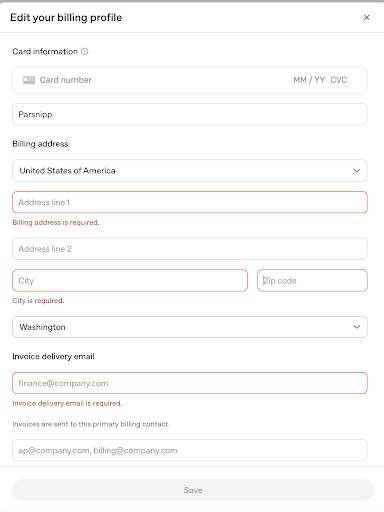
Once access is granted, go to Settings → Account info and set your advertiser name and logo exactly as they should render in the ad unit. Then go to Settings → Billing and add a billing profile plus a payment method.
OpenAI is explicit: ads will not serve until both steps are complete — even if the campaign looks active.
S T E P 03
Build the campaign
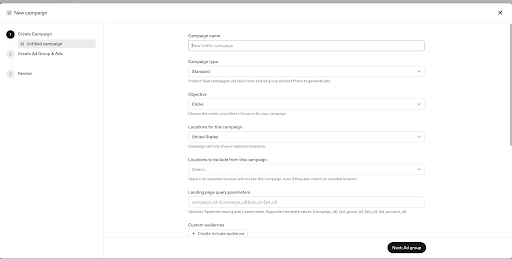
Click Create → Create Campaign and set the name, objective, budget, start and end dates, and target country.
Choose your objective based on intent:
-
Clicks (CPC) — for direct response. Recommended starting max bid $3 to $5.
-
Reach (CPM) — for visibility and brand plays. Default max bid $60.
S T E P 04
Create an ad group with context hints
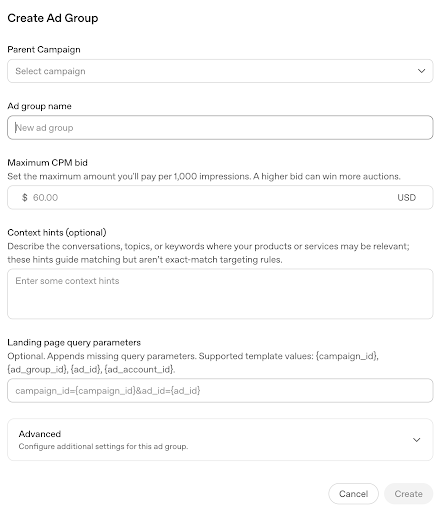
Add an ad group under the campaign, set a max bid, and write context hints — plain-language descriptions of the conversation topics where the ad should be eligible to appear. There are no keywords or match types here, which is the main thing that sets conversational advertising apart from search ads.
Keep each ad group to one buyer situation so the hints stay coherent and reporting stays readable per theme. This is exactly where the targeting discipline from principle one pays off: the tighter and more specific your hints, the less budget you waste on the wrong conversations.
S T E P 05
Build the ad, validate, and launch
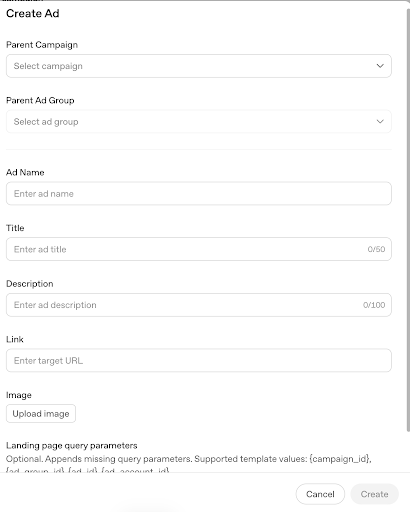
Add your advertiser name, favicon/logo, and creative within OpenAI’s limits:
-
Headline — 16 to 24 characters
-
Ad copy — 32 to 48 characters
-
Image — square, up to 1200×1200px
-
Landing page URL — publicly accessible, with UTM parameters for tracking
Confirm naming is consistent and hints are correctly formatted, set status to Active, and submit. Impressions typically start within 24 hours; reporting can lag up to 7 hours.
Watch your budget pacingBudget pacing can vary across a 7-day period for daily budgets — some days may spend more than others. There is currently no budget pacing for lifetime budgets, so proceed carefully: end dates only control when the ad can run, not the pacing of the overall spend.
THE PLAYBOOK IN ONE LINE
Set it up in five steps, win it with three principles.
The setup is the easy part. The advertisers who get real return from ChatGPT ads are the ones who target with precision, run paid and organic as one surface, and work the whole funnel instead of camping at the top.
01 Target- Use every input to stay laser-focused. Know your customer, their problem, their journey stage.
02 Layer - Supplement organic visibility with paid. Maximize relevant AI coverage as one system.
03 Full Funnel - Map to product and prompt, not just brand. Middle-of-pack costs reward real intent.